Kendaks R&D guide

Azure Firewall Hub-and-Spoke Network with Azure Virtual Desktop

Category: Networking & End-user Computing

Scenario: A BPO runs 24/7 agents on Azure Virtual Desktop and must enforce centralized egress/ingress inspection. Example: 'Kendaks BPO' uses a hub VNet with Azure Firewall and multiple spoke VNets for AVD host pools.

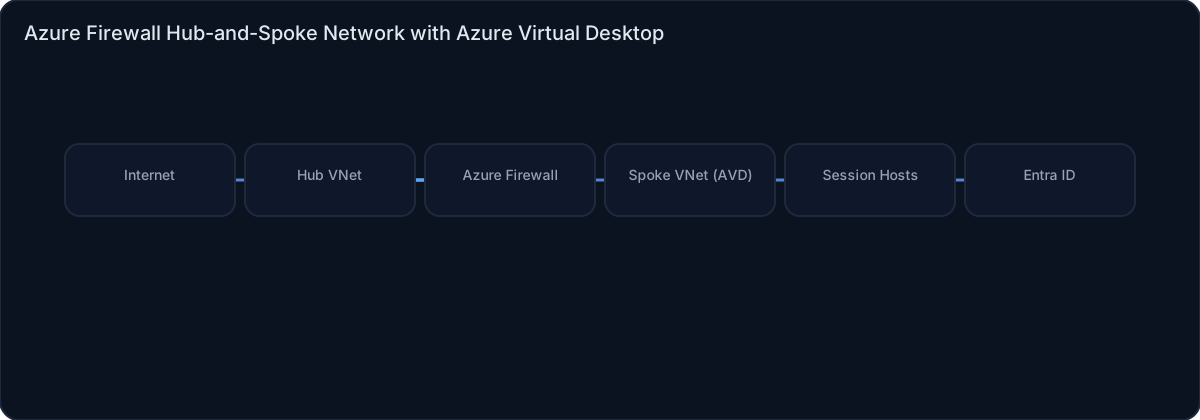
Architecture diagram

High-level view of the main components and data/control flows.

Architecture diagram

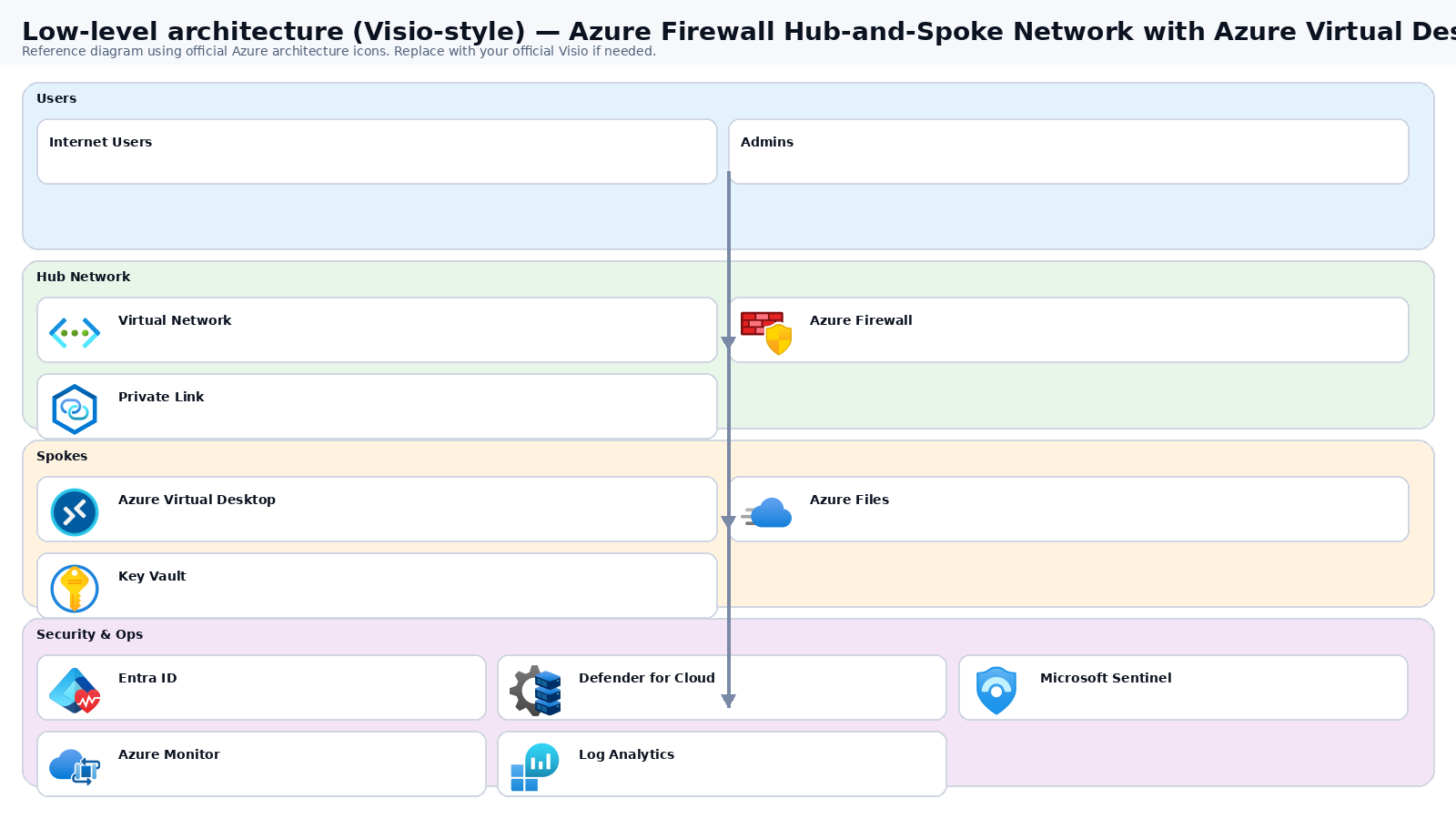
Low-level architecture diagram (Visio-style)

Implementation view (networking, security, ops). Click to open full size.

Low-level architecture diagram

Low-level architecture details

Subscriptions & resource groups

  • Hub: hub-shared-prd (network/security). Workload: workloads-euc-prd (AVD).
  • Hub RGs (per region): rg-hub-*-net, rg-hub-*-sec, rg-hub-*-dns, rg-hub-*-mon.
  • AVD RGs (per region): rg-avd-*-avd (host pool/app groups/workspace), rg-avd-*-hosts, rg-avd-*-storage, rg-avd-*-ops.

IP plan (2 regions)

  • Hub EUS: vnet-hub-prd-eus 10.0.0.0/16; Hub CUS: vnet-hub-prd-cus 10.1.0.0/16.
  • AVD EUS: vnet-avd-prd-eus 10.10.0.0/16; AVD CUS: vnet-avd-prd-cus 10.11.0.0/16.

Hub components (per region)

  • Subnets: AzureFirewallSubnet, AzureFirewallManagementSubnet, GatewaySubnet (optional ER/VPN), AzureBastionSubnet (recommended).
  • Azure Firewall (Standard/Premium) + Firewall Policy + diagnostics to Log Analytics.
  • Private DNS zones + (optional) DNS Private Resolver for hybrid name resolution.

Spoke routing (forced egress)

  • Peer spoke VNets to hub (per region).
  • UDR on AVD subnets: 0.0.0.0/0 → next hop Azure Firewall private IP.
  • On-prem prefixes → next hop ER/VPN gateway (if used).

Firewall policy structure (recommended)

  • rcg-base-egress: Windows Update/Defender endpoints + core SaaS allowlist.
  • rcg-avd-egress: required AVD service connectivity (maintain allowlist artifact).
  • rcg-private-endpoints: spoke → private endpoint IPs (Azure Files/Key Vault/etc.).
  • rcg-deny-all: deny and log everything else; enable Threat Intelligence.

AVD objects (per region)

  • Host pools: hp-avd-prd-eus, hp-avd-prd-cus; app groups + workspace.
  • Session hosts in snet-avd-sessionhosts; autoscale via scaling plan (recommended).

Identity / join patterns (include both)

  • Pattern A (cloud-first): Entra ID joined session hosts + Intune; Conditional Access enforces MFA + compliant devices.
  • Pattern B (legacy apps): AD DS / Azure AD DS joined; GPO manages FSLogix and app policies; still enforce Conditional Access for user access.

Profiles (FSLogix)

  • Azure Files (common start): private endpoint (privatelink.file.core.windows.net), backups + snapshots, public access off.
  • ANF (enterprise DR): cross-region replication for profiles (faster failover).

Monitoring & ops

  • AVD Insights + session host metrics; alert on connection failures and host health.
  • Firewall denies/TI hits + SNAT usage; patch compliance via Update Manager.

DR/HA

  • Active/Passive: CUS warm standby; failover runbook enables scaling and reassigns users.
  • Active/Active: split users across regions; reduces blast radius.

Mermaid (copy/paste)

flowchart LR
  subgraph HubEUS[Hub EUS]
    AFW1[Firewall EUS]
    DNS1[Private DNS/Resolver]
    BAS1[Bastion]
  end
  subgraph AVDEUS[AVD Spoke EUS]
    SHEUS[Session Hosts]
    PEEUS[PE Subnet]
    FILEEUS[Azure Files/ANF Profiles]
  end
  subgraph HubCUS[Hub CUS]
    AFW2[Firewall CUS]
  end
  subgraph AVDCUS[AVD Spoke CUS]
    SHCUS[Session Hosts]
    FILECUS[Profiles DR]
  end
  Users[Users] --> AVDsvc[AVD Control Plane]
  AVDsvc --> SHEUS
  AVDsvc --> SHCUS
  SHEUS -->|UDR 0/0| AFW1
  SHCUS -->|UDR 0/0| AFW2
  SHEUS --> PEEUS --> FILEEUS
  DNS1 --- AVDEUS

Step-by-step implementation

Step 1/6
Plan

Define hub-spoke topology and IP plan
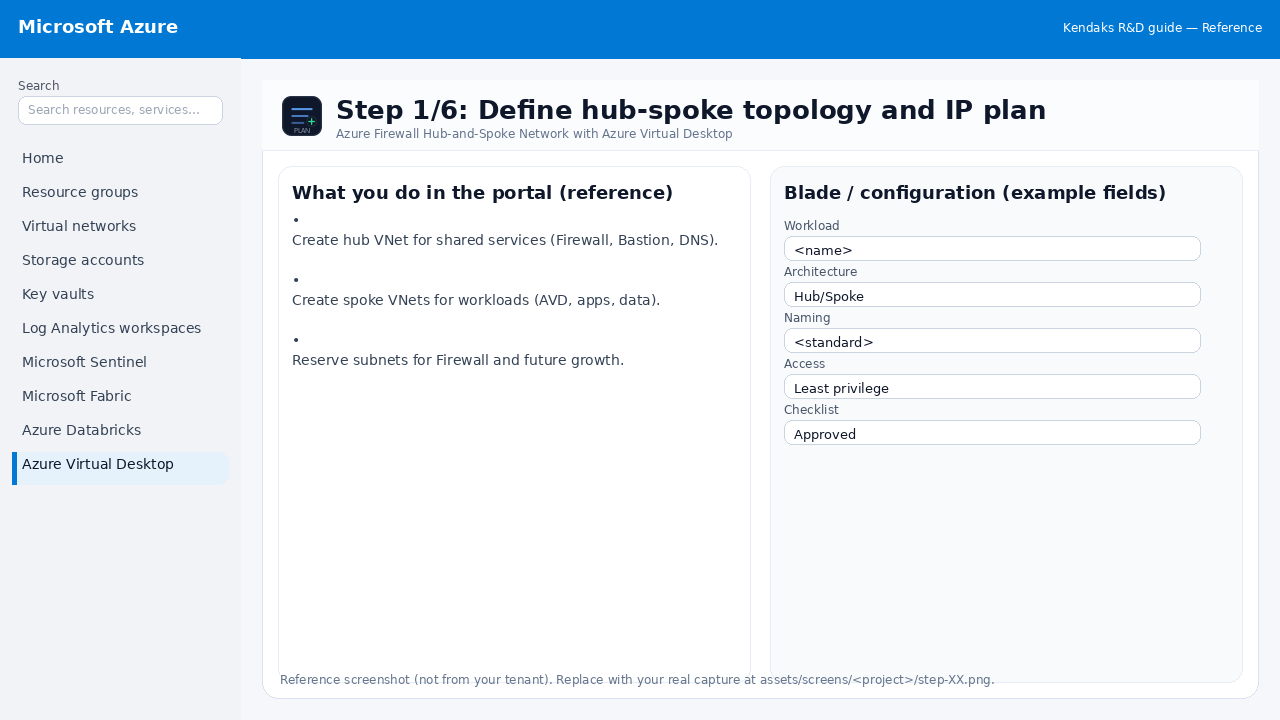
Reference screenshot for Azure Firewall Hub-and-Spoke Network with Azure Virtual Desktop step 1
Reference portal screenshot (click to zoom). Replace with your tenant capture if needed.
  • Create hub VNet for shared services (Firewall, Bastion, DNS).
  • Create spoke VNets for workloads (AVD, apps, data).
  • Reserve subnets for Firewall and future growth.
Validation checklist
  • Stakeholders have signed off the scope, SLAs, and data/security requirements.
  • You have documented naming standards, environments, and ownership (RACI).
Zoomed screenshot
Step 2/6
Network

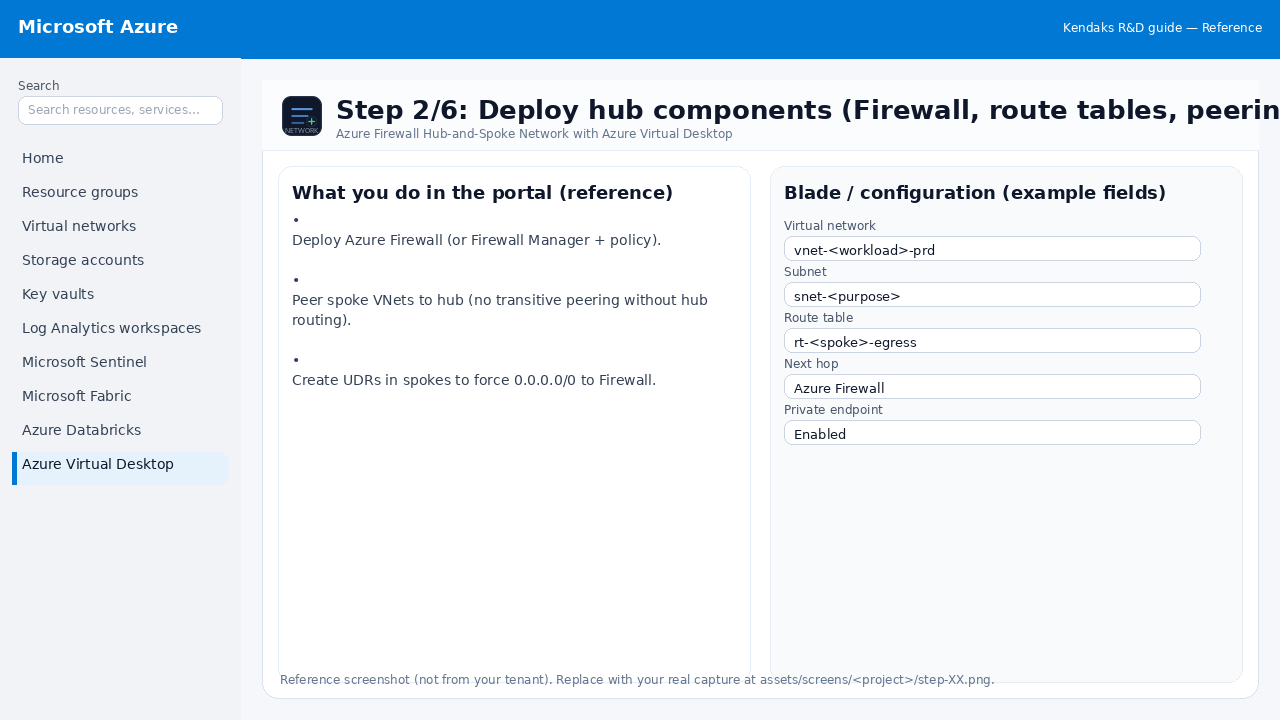
Deploy hub components (Firewall, route tables, peering)

Reference screenshot for Azure Firewall Hub-and-Spoke Network with Azure Virtual Desktop step 2
Reference portal screenshot (click to zoom). Replace with your tenant capture if needed.
  • Deploy Azure Firewall (or Firewall Manager + policy).
  • Peer spoke VNets to hub (no transitive peering without hub routing).
  • Create UDRs in spokes to force 0.0.0.0/0 to Firewall.
Example code / notes
# Example: set UDR next hop to Azure Firewall
az network route-table route create -g rg-net -n defaultToFirewall \
  --route-table-name rt-spoke --address-prefix 0.0.0.0/0 --next-hop-type VirtualAppliance --next-hop-ip-address <FW_PRIVATE_IP>
Validation checklist
  • The target VNet/subnets/peerings/UDRs/NSGs are deployed with no errors.
  • Connectivity test passes (e.g., Network Watcher connection troubleshoot / ping between subnets where allowed).
  • Egress is controlled (traffic observed in Firewall logs if applicable).
Zoomed screenshot
Step 3/6
Secure

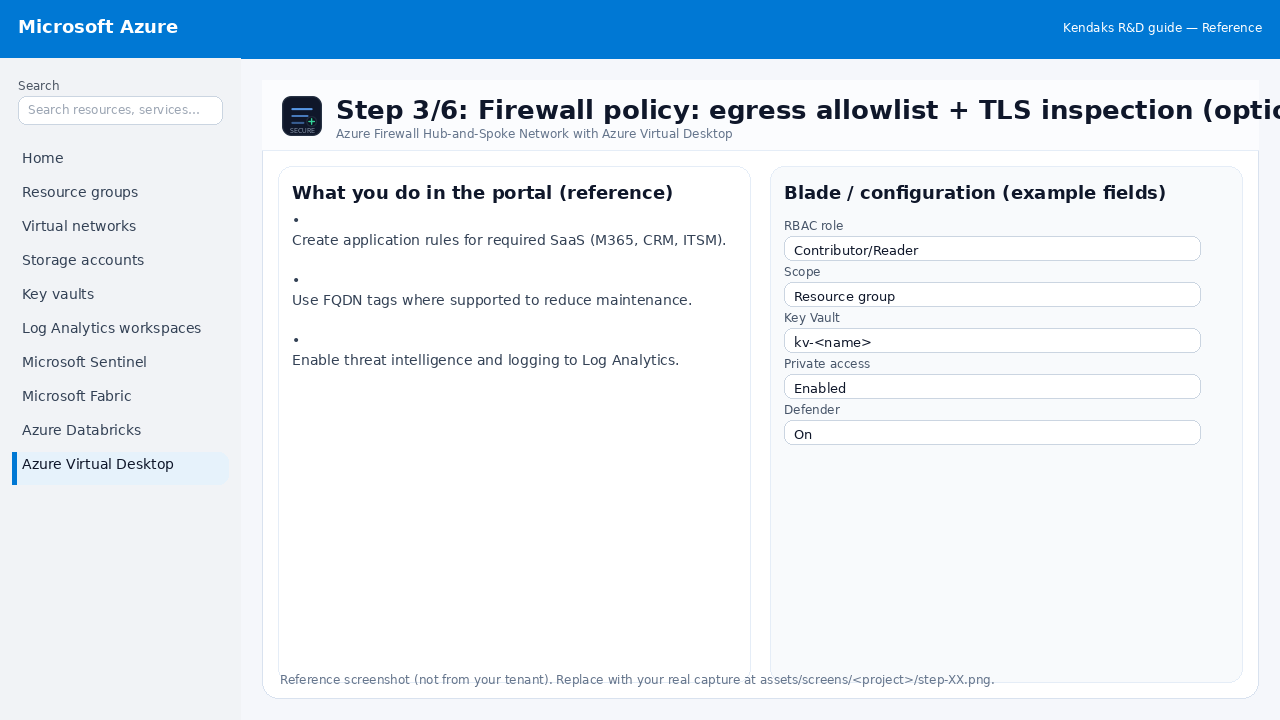
Firewall policy: egress allowlist + TLS inspection (optional)

Reference screenshot for Azure Firewall Hub-and-Spoke Network with Azure Virtual Desktop step 3
Reference portal screenshot (click to zoom). Replace with your tenant capture if needed.
  • Create application rules for required SaaS (M365, CRM, ITSM).
  • Use FQDN tags where supported to reduce maintenance.
  • Enable threat intelligence and logging to Log Analytics.
Validation checklist
  • Security baseline applied (Defender/Policy/WAF/Firewall rules as applicable).
  • No public endpoints unless explicitly approved; private endpoints verified where applicable.
  • Alerts are configured for high-risk events.
Zoomed screenshot
Step 4/6
Identity

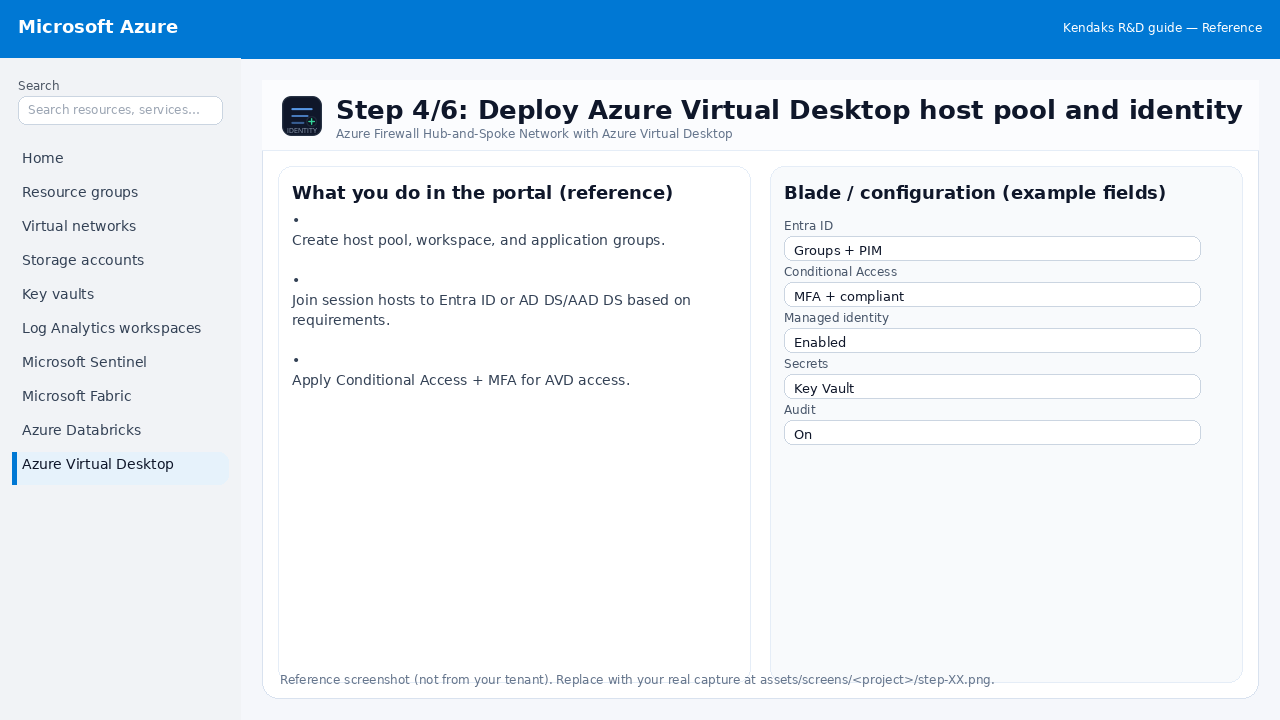
Deploy Azure Virtual Desktop host pool and identity

Reference screenshot for Azure Firewall Hub-and-Spoke Network with Azure Virtual Desktop step 4
Reference portal screenshot (click to zoom). Replace with your tenant capture if needed.
  • Create host pool, workspace, and application groups.
  • Join session hosts to Entra ID or AD DS/AAD DS based on requirements.
  • Apply Conditional Access + MFA for AVD access.
Validation checklist
  • Entra groups/roles are configured; privileged roles protected via PIM.
  • Conditional Access/MFA policies are enforced for relevant access paths.
Zoomed screenshot
Step 5/6
Monitor

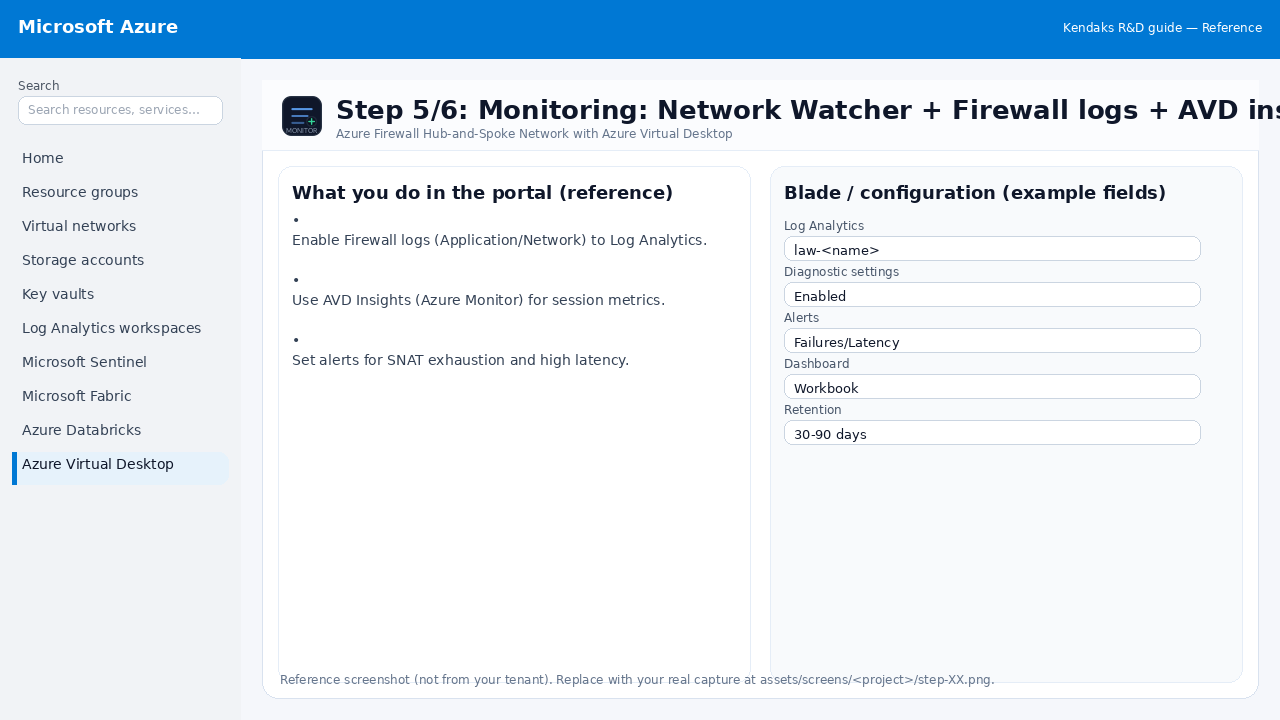
Monitoring: Network Watcher + Firewall logs + AVD insights

Reference screenshot for Azure Firewall Hub-and-Spoke Network with Azure Virtual Desktop step 5
Reference portal screenshot (click to zoom). Replace with your tenant capture if needed.
  • Enable Firewall logs (Application/Network) to Log Analytics.
  • Use AVD Insights (Azure Monitor) for session metrics.
  • Set alerts for SNAT exhaustion and high latency.
Validation checklist
  • Logs and metrics are flowing (check Log Analytics / Monitor).
  • Alerts trigger correctly (test alert path to email/Teams/ITSM).
Zoomed screenshot
Step 6/6
Test

Validation: forced tunneling + user experience

Reference screenshot for Azure Firewall Hub-and-Spoke Network with Azure Virtual Desktop step 6
Reference portal screenshot (click to zoom). Replace with your tenant capture if needed.
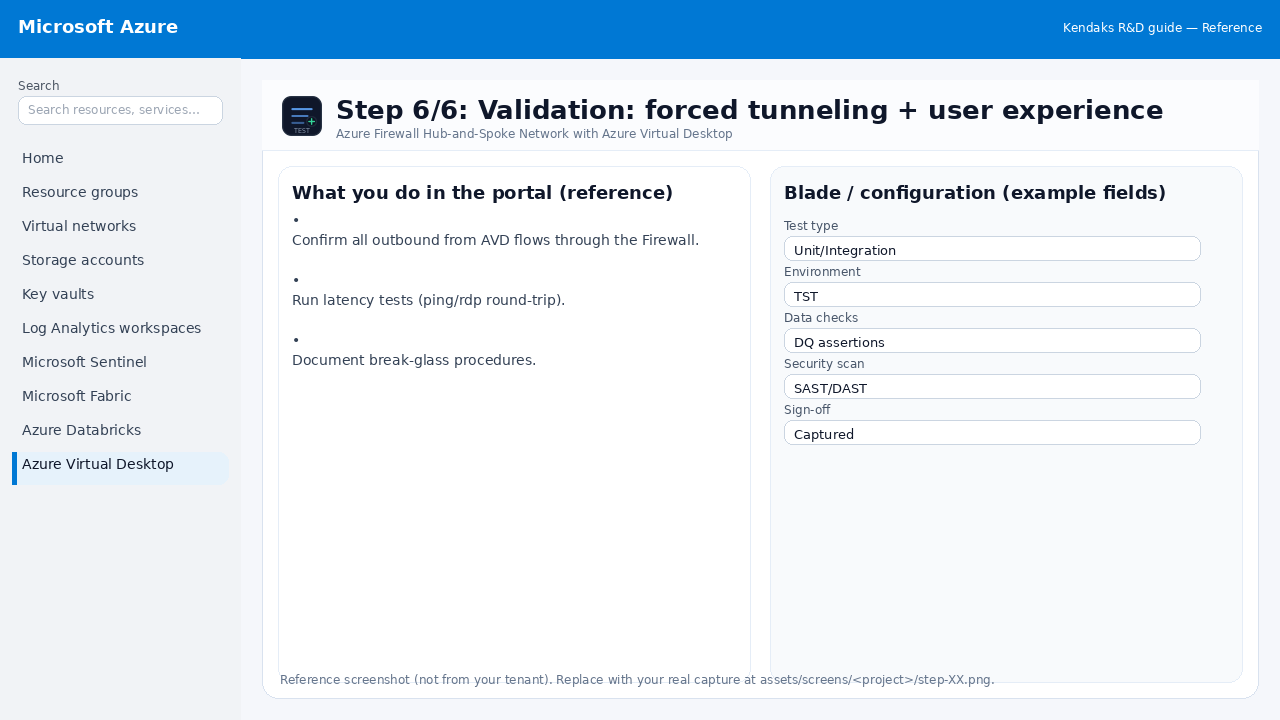
  • Confirm all outbound from AVD flows through the Firewall.
  • Run latency tests (ping/rdp round-trip).
  • Document break-glass procedures.
Validation checklist
  • UAT completed with representative users and scenarios.
  • Performance meets baseline; issues tracked and remediated.
Zoomed screenshot

Video tutorials

References